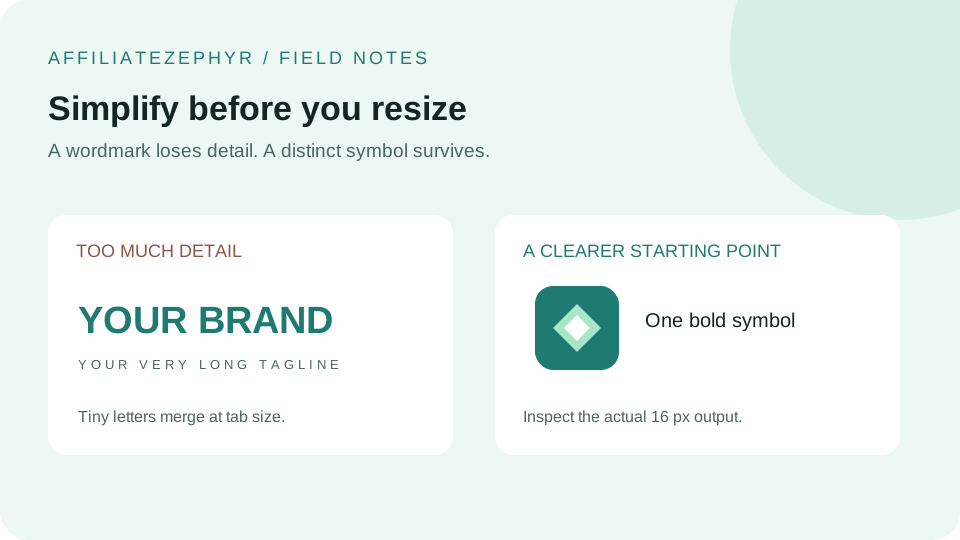
A logo that looks polished and detailed at full size can become a completely illegible smudge once shrunk down to a 16x16 pixel browser tab icon — genuinely one of the most demanding design constraints in everyday web design, precisely because the canvas is so small.
Simplify ruthlessly
The single most important principle: a 16x16 favicon has room for roughly one simple shape or one or two letters at most — fine detail, thin lines, and small text simply don't survive at this resolution. If your full logo includes a wordmark, a tagline, or intricate detail, the favicon version needs to distill it down to its single most recognizable core element, not attempt to reproduce the whole thing in miniature.
Favor bold, simple shapes over detailed illustrations
Geometric shapes, a single bold letter, or a simplified icon-style mark tend to survive the shrink to 16x16 far better than a detailed illustration or a multi-element logo. This is part of why so many well-known brand favicons are just a single letter or a simplified geometric symbol, rather than their full logo.
High contrast matters more at small sizes
Subtle color gradients or low-contrast color combinations that look sophisticated at full size often blur together into an indistinct blob at 16x16. A favicon benefits from stronger, more clearly differentiated colors than you might otherwise choose for a full-size logo — see our related guide on favicon color theory.
Test at actual size, not just zoomed in
A common mistake is designing and evaluating a favicon while zoomed in at a large working size, where every detail is easy to see — then discovering it's illegible once actually viewed at real-world 16x16 size in a browser tab. Always preview the final design at its true, tiny target size before finalizing it, ideally in an actual browser tab rather than just a design tool's preview.
Consider designing the favicon separately from your main logo
Rather than starting with a full logo and shrinking it down (which is where legibility problems typically originate), some designers create a purpose-built, simplified "icon mark" specifically for favicon and small-icon use, distinct from (but visually related to) the main logo used elsewhere. This is a more deliberate approach that tends to produce better results than a naive shrink of an already-detailed design.
Letters and initials work well at small sizes
A single bold letter or a two-letter monogram, set in a simple, geometric typeface, is one of the most reliable approaches for small favicon sizes — it's simple enough to remain legible, distinctive enough to be recognizable, and doesn't require an illustrative element that risks turning into a blur.
Once you have a working small design, scale up from there
A design that works well at 16x16 will generally scale up cleanly to the larger sizes (32, 48, and beyond) without losing quality, since you're adding more resolution to reveal a design that was already validated at the hardest, smallest size — the reverse process (starting large and hoping it shrinks well) is considerably less reliable.
See it at real size instantly
Our free Favicon Generator shows a live preview of your uploaded image at every standard size, including the demanding 16x16, so you can immediately see whether your design choice holds up before finalizing anything.
Exercise: simplify a wordmark into a tab icon
Take a copy of your original artwork, remove its tagline, and keep just its most distinctive initial or symbol. Place that mark on a square canvas with space around it. Generate the set and open the 16 px PNG at actual size. Compare it with an export of the full wordmark: can you identify the brand without enlarging either image?
If a counter inside a letter closes up, enlarge that opening in the source. If a thin outline disappears, replace it with a heavier shape. If two neighboring shapes merge, increase the gap or remove the less important shape. Change one feature at a time and compare the two exported files.
A repeatable review checklist
- Can the silhouette be distinguished from other icons already in the tab bar?
- Does the mark remain visible on both a pale and a dark background?
- Does the exported square preserve the intended outer edges?
- Is the small icon recognizable without relying on a tagline or gradient?
Automated resizing uses the same source for every size. It cannot make these design decisions for you. If the smallest export still fails the checklist, simplify the source before increasing its resolution.
Keep reading: